
“We use HTTPS. Why can I still see the API response?”
During a vulnerability assessment and penetration test (VAPT) at Northstar Bank, a security tester opens the browser’s DevTools and inspects a Video KYC session. The Network panel shows this API response:
{
  "customer_name": "Asha Rao",
  "phone": "+91-90000-00000",
  "email": "asha.rao@example.test",
  "date_of_birth": "1994-08-12",
  "kyc_status": "pending"
}
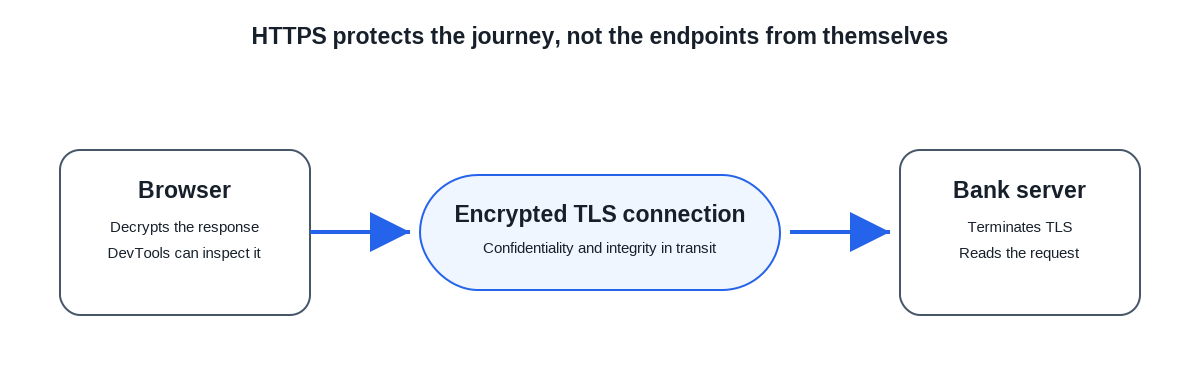
HTTPS is working as expected. It encrypts data while it travels between the bank’s server and the browser. When the response arrives, the browser decrypts it so the application can use it.
Anyone who controls the browser can inspect that response or change what the page displays. HTTPS protects data in transit. It does not make the browser trusted or decide what data the backend should return.
The security tester reports two problems:
- Sensitive data exposure: Anyone with access to the browser can see sensitive data, including PII, returned by the API.
- Response tampering: Using an interception tool, the tester changes the KYC status from
pendingtoapproved. To the tester’s surprise, the frontend moves to the approved flow. Even worse, if the backend trusts this status, a user could activate an account or access a restricted banking feature without completing KYC.
Problem 1: Sensitive data exposure
Return only what the frontend needs
The API returns more data than the frontend needs. The simplest fix is not to send it.
If the frontend only needs the KYC status, return only the status and a generated reference:
{
  "user_ref": "usr_7f4c9a2e1d6b",
  "kyc_status": "pending"
}
Note: Do not use a phone number, email address, or other PII as an API identifier. Generate a random value such as
user_refinstead.
In production, define exactly which fields each API may return. Check access, mask partial values when possible, avoid logging sensitive data, and use Cache-Control: no-store for sensitive responses.
What if an API genuinely needs to send sensitive fields?
Attempt 1: Base64 encoding
A common idea is to Base64-encode the API response. The result looks unreadable, but anyone can decode it.
This small example uses ASCII-only JSON so btoa and atob can operate on it directly:
const body = '{"kyc_status":"pending"}';

const encoded = btoa(body);
console.log(encoded); // eyJreWNfc3RhdHVzIjoicGVuZGluZyJ9

const decoded = atob(encoded);
console.log(decoded); // {"kyc_status":"pending"}
Base64 has two problems:
- No protection: Anyone can decode, read, change, and encode the value again.
- More data: Three input bytes become four characters, making the payload roughly 33% larger before compression.
Base64 is an encoding format, not encryption.
Attempt 2: Symmetric encryption in the browser
Symmetric encryption uses the same secret key to encrypt and decrypt data. The backend encrypts the response, and the frontend decrypts it.
// Educational pseudocode, not a production encryption implementation.
const encryptedResponse = encrypt(responseBody, sharedKey); // backend
const responseBody = decrypt(encryptedResponse, sharedKey); // frontend
The problem: The browser needs the secret key to decrypt the data. A user can inspect the code, extract the key, or read the data after decryption.
Symmetric encryption works between trusted systems that can protect the key. It cannot hide data from someone who controls the browser.
Can obfuscation hide the key?
Obfuscation transforms readable JavaScript into code that is harder to understand.
Before obfuscation:
const sharedKey = "demo-key-for-illustration";
const responseBody = decrypt(encryptedResponse, sharedKey);
After obfuscation:
const _0x2a = ["demo-", "key-", "for-", "illustration"];
const _0x91 = _0x2a.join("");
const _0xb7 = decrypt(_0xe4, _0x91);
The browser must still rebuild the key to decrypt the data. A user can pause the code and inspect it. Obfuscation slows inspection; it does not keep the key secret.
Takeaway: Sensitive data exposure
Takeaway: A user with access to the browser can inspect any data the frontend uses. Base64 and obfuscation only make an API response harder to read in the Network tab.
Encryption cannot hide decrypted data from browser DevTools or a client-side interception tool. A digital signature can detect whether a response was modified after decryption. We will cover its use and limitations in the next problem.
Send only the required data and enforce every sensitive action on the backend.
Now let us solve the second problem: changing pending to approved.
Problem 2: Response tampering
The team wants the frontend to detect whether an API response was changed. It starts by adding a hash to the response headers.
Start with a hash header
The first version uses a hash, which converts input data into a fixed-size value. A different input produces a different hash.
The backend calculates:
SHA-256(prefix + exactResponseBody + postfix)For example:
prefix  = "bank-v1:"
body    = '{"user_ref":"usr_7f4c9a2e1d6b","kyc_status":"pending"}'
postfix = ":video-kyc"
It sends the result in a response header:
HTTP/1.1 200 OK
Content-Type: application/json
X-Response-Hash: <SHA-256 hash>

{"user_ref":"usr_7f4c9a2e1d6b","kyc_status":"pending"}
The frontend uses the same rule:
// Conceptual example
const expected = sha256(prefix + rawResponseBody + postfix);
const received = response.headers.get("X-Response-Hash");

if (expected !== received) {
  throw new Error("Response was modified");
}
If the body changes from pending to approved but the header stays unchanged, the values no longer match. The frontend can reject the response.
Both sides must hash the exact same bytes. Spaces, line breaks, or a different JSON field order can cause a mismatch even when the data means the same thing.
The hack: Change the body and the header
The prefix, postfix, and hashing code are all available in the frontend. A user can inspect them and create a matching hash for a modified body:
{ "user_ref": "usr_7f4c9a2e1d6b", "kyc_status": "approved" }modified body + same prefix + same postfix -> new valid hashThe user replaces both the response body and X-Response-Hash. The frontend compares them and sees a match.
Limitation: This approach is not tamper-proof. The prefix, postfix, and hashing logic are available in the frontend code, so a user can calculate the same hash for a modified response.
We need a value that only the backend can create but the frontend can verify. We will build that with public and private keys next.
Improve it with a digital signature
A digital signature uses a key pair:
- The backend protects a private key and uses it to sign the API response.
- The frontend uses the backend’s trusted public key to verify the signature.
- If the signed content changes, verification fails.
- Knowing the public key does not let someone create a valid signature.
The public key can be visible because it verifies signatures but cannot create them. The frontend must receive that key through a trusted source, not from the response being checked.
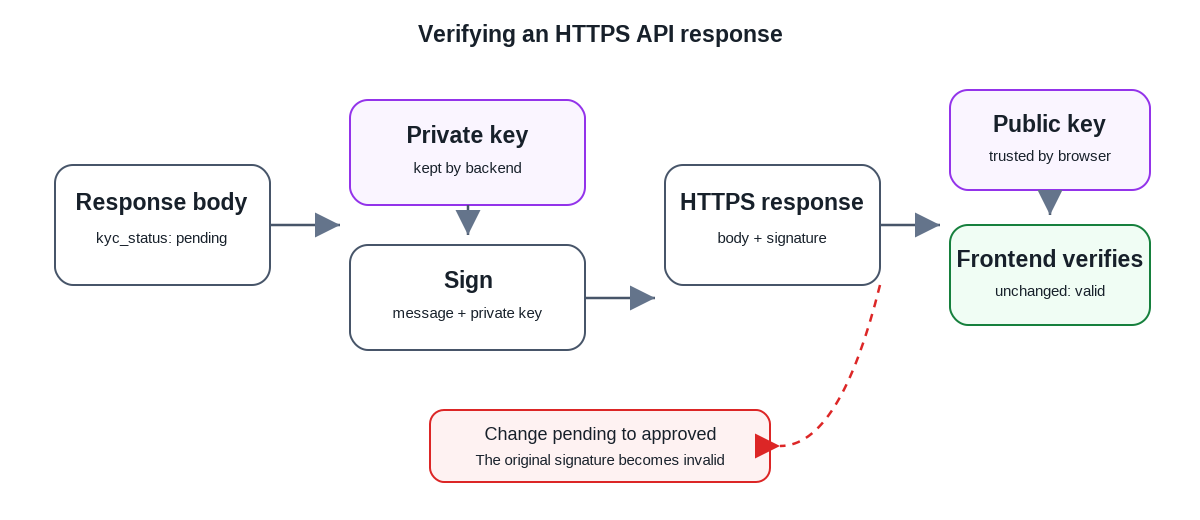
In this HTTPS API flow, the backend signs the exact response body with its private key and sends the body and signature to the browser. The frontend uses the trusted public key to verify them. If an interception tool changes pending to approved, the body no longer matches the signature and verification fails.
The backend can also send the expiry time in a response header:
HTTP/1.1 200 OK
Content-Type: application/json
X-Response-Signature: <digital signature>
X-Response-Expires-At: 2026-10-16T10:05:00Z

{"user_ref":"usr_7f4c9a2e1d6b","kyc_status":"pending"}
The backend combines the expiry header and exact response body, then signs those bytes:
signature = Sign(privateKey, expiresAt + "\n" + exactResponseBody)The frontend rebuilds the same value and verifies the signature. It then compares X-Response-Expires-At with the current time and rejects an expired response. This prevents someone from capturing an older, valid response and replaying it later. Because the expiry header is signed, changing it also makes verification fail.
The frontend needs strict verification rules:
| Situation | Frontend action |
|---|---|
| A required signature is missing | Reject the response. |
| The signature is invalid | Reject the response. |
The signature is valid but X-Response-Expires-At has passed |
Reject the response. |
| The public key arrives inside the same untrusted response | Do not trust it. Use a configured or otherwise trusted key. |
Scope: This design helps the frontend detect whether an API response was modified after HTTPS was decrypted, such as through a client-side interception tool. A user who rewrites the frontend verification code can still bypass this check, but that separate client-trust problem is outside this example.
A runnable Ed25519 example
This example signs the expiry header and response body together. Changing the status makes verification fail.
import json

from cryptography.exceptions import InvalidSignature
from cryptography.hazmat.primitives.asymmetric.ed25519 import Ed25519PrivateKey


def serialize(body: dict) -> bytes:
    # This is a deterministic format for this demonstration only.
    return json.dumps(body, sort_keys=True, separators=(",", ":")).encode("utf-8")


def signing_input(expires_at: str, raw_body: bytes) -> bytes:
    return expires_at.encode("utf-8") + b"\n" + raw_body


private_key = Ed25519PrivateKey.generate()
public_key = private_key.public_key()

body = {
    "user_ref": "usr_7f4c9a2e1d6b",
    "kyc_status": "pending",
}
expires_at = "2026-10-16T10:05:00Z"

raw_body = serialize(body)
message = signing_input(expires_at, raw_body)
signature = private_key.sign(message)

try:
    public_key.verify(signature, message)
    print("original: valid")
except InvalidSignature:
    print("original: invalid")

modified_body = {**body, "kyc_status": "approved"}

try:
    modified_message = signing_input(expires_at, serialize(modified_body))
    public_key.verify(signature, modified_message)
    print("modified: valid")
except InvalidSignature:
    print("modified: invalid")
Install the dependency and run the file:
python -m pip install cryptography
python signature_demo.py
Expected output:
original: valid
modified: invalid
This demonstrates the core idea, not a complete HTTP signing protocol. In production, protect and rotate private keys, define the exact signed bytes, check freshness, and use a reviewed protocol and library such as HTTP Message Signatures (RFC 9421) (opens in a new tab).
Takeaway: Response tampering
Takeaway: The backend signs the API response with its private key. The frontend verifies it with a trusted public key and rejects a changed, invalid, or expired response. This provides a clear response-integrity check for VAPT demonstrations. Treat it as tamper detection, not as a security boundary or a replacement for backend validation.
Join the discussion
Spot a mistake or have another perspective? Share your feedback, insights, or suggestions.