
Selling a ticket sounds like ordinary e-commerce: choose an item, pay, and receive an order. The resemblance ends when a stadium has 50,000 seats and several million fans try to buy them at the same moment. Every seat is unique, demand arrives as a flash crowd, payment takes seconds, and one oversold seat can send two customers to the same chair.
Let’s design a Ticketmaster-style ticket-booking system step by step, starting with its requirements. This is an interview exercise, not a description of Ticketmaster’s private production architecture.
Functional Requirements: What Should the System Do?
We will support six core features:
- Discover events. Search and browse by artist, venue, category, city, and date.
- View availability. Load the venue map, ticket types, prices, and approximately current availability.
- Hold seats. Temporarily reserve selected seats while the customer checks out.
- Purchase tickets. Collect payment and convert a valid hold into an order.
- Deliver tickets. Issue secure digital tickets and let customers view their orders.
- Manage extreme demand. Keep booking available when many customers arrive for one popular event.
This first version covers assigned seats. Event creation, resale, dynamic pricing, customer-requested refunds, ticket transfer, and venue admission are outside its scope. Compensating refunds remain necessary when payment succeeds but an order cannot be fulfilled.
Non-Functional Requirements: How Well Should It Work?
These are design targets for the workload below, not measured production results.
| Requirement | Design target |
|---|---|
| Correctness | One owner per event seat; consume a hold only once |
| Read consistency | Availability and search may briefly lag; booking must use current database state |
| Latency | p95 below 300 ms for event details and cached section reads; below 500 ms for admitted holds |
| Availability | Keep browsing available where possible; fail booking safely during partial failures |
| Durability | Preserve committed bookings and tickets after a single database-node failure |
| Peak traffic | Handle concentrated demand without overwhelming booking |
| Admission and limits | Enforce event admission and per-account purchase caps |
Redis capacity is sized for the cached working set, while PostgreSQL capacity must account for hold attempts, checkout updates, and transaction contention. More cache memory alone does not increase safe booking throughput. Queue waiting and external payment time are excluded from the API latency targets. No benchmark or failover test has been run for this conceptual design.
Capacity Estimation
These hypothetical assumptions cover normal traffic, a hot event, and the Redis working set separately.
Normal Traffic
- 10 million events per year and 100 million monthly active users.
- 20 million event-detail views per day.
- 200 million section-availability reads per day, assuming 10 section loads or refreshes per event-detail view.
- 10 million hold attempts per day, including attempts that conflict, expire, or never become purchases.
- 2 million completed orders per day, averaging 4 tickets per order.
- 10× average traffic as a rough normal-peak estimate. A hot sale is considered separately below.
Using 86,400 seconds per day, rounded for readability:
| Operation | Average rate/s | Approximate normal peak/s |
|---|---|---|
| Event-detail reads | 20 M ÷ 86,400 ≈ 230 | 2,300 |
| Section-availability reads | 200 M ÷ 86,400 ≈ 2,300 | 23,000 |
| Hold attempts | 10 M ÷ 86,400 ≈ 116 | 1,160 |
| Completed orders | 2 M ÷ 86,400 ≈ 23 | 230 |
| Tickets sold | 8 M ÷ 86,400 ≈ 93 | 930 |
These are operation rates, not SQL statement counts. One hold or checkout performs several database reads and writes. Failed checkouts, payment callbacks, and retries add work beyond completed orders.
One Hot Event
Assume a large event has 50 sections with 1,000 seats each, or 50,000 seats. One million customers arriving over five minutes means roughly 3,300 arrivals/s, potentially with a sharper burst at the start.
If 100,000 customers are actively browsing and each requests one section every five seconds:
100,000 ÷ 5 = 20,000 availability reads/sThat is traffic for one event, competing for a small set of section keys. Redis reduces repeated database reads, while the virtual queue limits how many customers may attempt holds and checkout. Set admission limits from load-tested booking capacity, not from the arrival rate or daily average.
Redis Working Set
For a conservative sizing example, assume 1,000 large events are fully cached at once, using the same 50-section, 50,000-seat model. Smaller events and partially cached events use less space.
Assume 100 serialized bytes per seat, including its ID, price, availability, and version. Store each section as a Redis hash, with one field per seat:
| Scope | Calculation | Payload size |
|---|---|---|
| One section key | 1,000 seats × 100 bytes | 100 KB |
| One large event | 50 section keys × 100 KB | 5 MB |
| 1,000 fully cached large events | 1,000 × 5 MB | 5 GB |
This is 50,000 section keys containing 50 million seat entries. The annual event count does not determine cache size: only the events and sections retained in Redis do.
The estimate covers payload, using decimal KB, MB, and GB. Redis data structures, keys, buffers, spare capacity, and replicas require additional memory. Measure actual section keys with MEMORY USAGE before choosing capacity. Static venue layouts, event-detail caches, and virtual-queue state are excluded.
Memory is only one limit. At 100 KB per section response, the hot-event example sends about 2 GB/s of uncompressed availability payload across 20,000 reads/s. Test network capacity and response size as well as Redis memory and request throughput.
Order Storage
If one order record plus its indexes and audit metadata averages 4 KB:
2 M orders/day × 4 KB × 365 ≈ 2.9 TB/yearThis excludes inventory, selected-seat records, payments, tickets, outbox data, replicas, and backups. It is an order-storage estimate, not the full PostgreSQL footprint.
API Design
The authenticated customer identity comes from the access token rather than a user ID in the request body.
Browse Events and Load Inventory
GET /api/v1/events?city=Mumbai&from=2026-11-01&cursor=eyJ...
GET /api/v1/events/evt_123
GET /api/v1/events/evt_123/availability?section=A
An availability response returns seat IDs, prices, and their current display states, but it is not a reservation. Another customer may hold a displayed seat before this customer submits a hold request.
Hold Seats
POST /api/v1/events/evt_123/holds
Authorization: Bearer <token>
Idempotency-Key: 7196f3d4-...
Content-Type: application/json
{
"seat_ids": ["A12", "A13"]
}{
"hold_id": "hold_456",
"status": "ACTIVE",
"expires_at": "2026-10-22T10:35:00Z",
"price": { "amount": 240.00, "currency": "INR" }
}At ₹120.00 per seat, this hold totals ₹240.00. The response price is the total for the selected seats. If any selected seat is unavailable, the entire request fails.
Purchase a Hold
POST /api/v1/holds/hold_456/checkout
Authorization: Bearer <token>
Idempotency-Key: e13bfdc2-...
Content-Type: application/json
{
"payment_method_token": "pm_tok_789"
}Checkout can succeed, fail, or remain in progress. If payment is still processing, return 202 Accepted with an order_id. This means, “We received your request, but your booking is not confirmed yet.” The customer can check the result using GET /api/v1/orders/{order_id}, even if their connection drops after clicking Pay.
Give each checkout attempt a unique reference called an idempotency key. When the customer retries, reuse that reference so the system continues the existing attempt instead of creating another order or charging again. Save the reference in the database with the customer, the action, and the request details so a server restart does not erase it. Reject attempts to reuse that reference with different request details.
Return 409 Conflict if someone else has already held or bought the requested seats. Return 410 Gone if the customer’s hold has expired and they need to select seats again.
High-Level Design
Start with the customer’s journey: find an event, choose seats, hold them, pay, and receive tickets. The API Gateway routes each request to Catalog, Inventory, or Order. All three services use one PostgreSQL database. A queue and worker handle ticket delivery after booking.
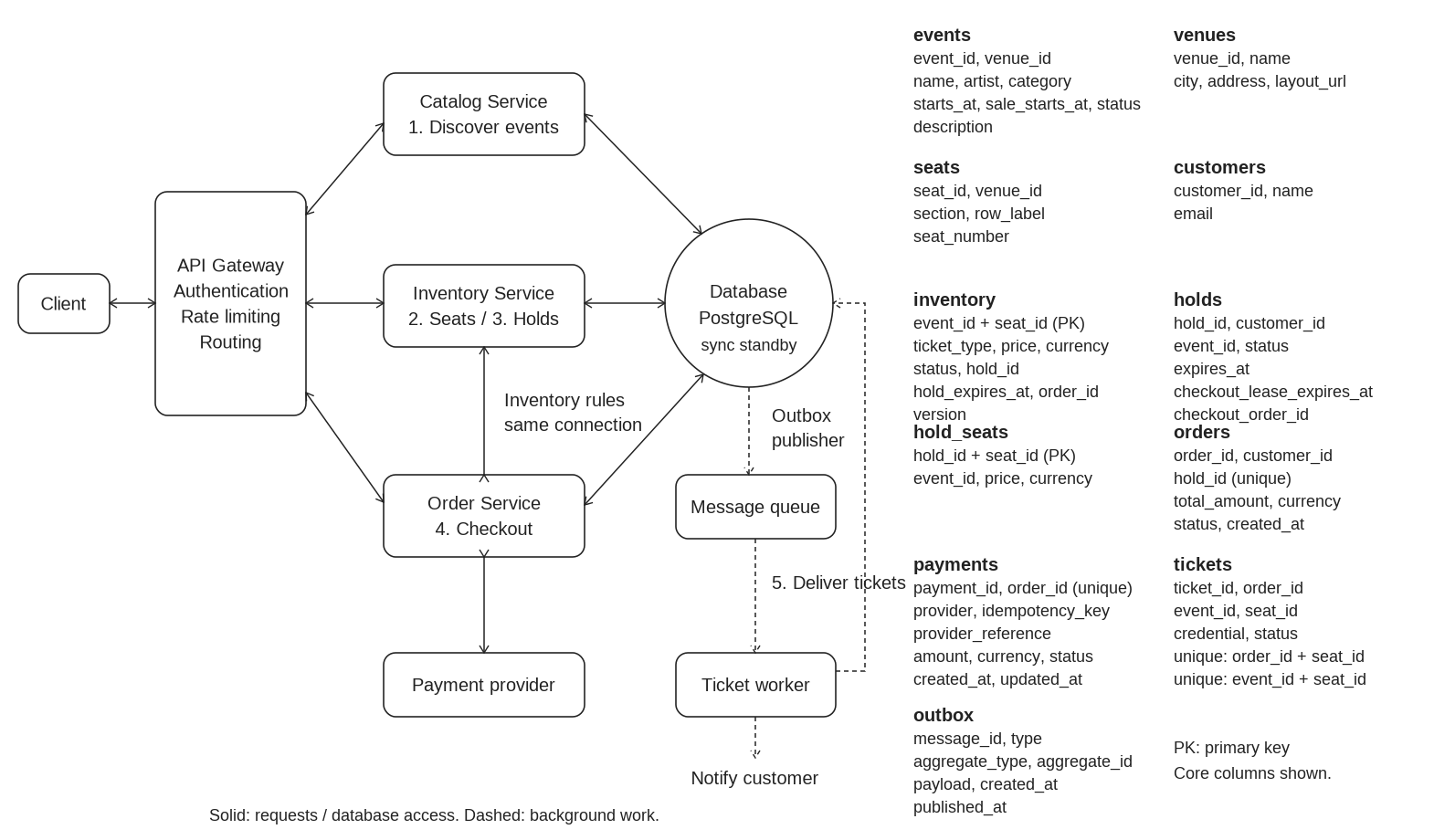
The lists alongside show the core tables, using the same names as the flow below. Primary keys identify records; foreign keys connect related records.
1. Discover Events
Client → API Gateway → Catalog Service → PostgreSQL
The customer searches for an event or opens its details. Catalog reads two tables:
events: what is happening? Read the name, artist, category, date, and event status.venues: where is it happening? Matchevents.venue_idtovenues.venue_idto get the venue name and city.
A SELECT reads rows. A JOIN combines matching rows from these tables, letting Catalog filter events by artist, venue, category, city, and date. This step only reads data; it does not reserve seats.
2. View Seat Availability
Client → API Gateway → Inventory Service → PostgreSQL
After choosing an event, the customer opens its seat map. Inventory reads:
events: find the venue. Look up the selectedevent_idand read itsvenue_id.seats: find the seat labels. Read that venue’s sections, rows, and seat numbers.inventory: add ticket type, price, and availability. Match each seat byseat_id, filtering inventory by the selectedevent_id.
The result combines a physical seat, such as A12, with its price and status for this event. The same seat can have a different price or status at another event.
These are read queries. A displayed seat is not reserved until the next step succeeds.
3. Hold Selected Seats
Client → API Gateway → Inventory Service → PostgreSQL transaction
Suppose the customer selects A12 and A13. We need three tables: holds for the reservation, hold_seats for its selected seats and prices, and inventory for each seat’s current state.
First validate that the request contains a nonempty list of distinct seat IDs belonging to this event and its venue. Inventory then performs the following steps in one transaction, a group of database changes that all succeed or all fail:
- Start with
BEGIN. Read and lock the selectedinventoryrows in a consistent order. A row lock makes competing writes wait while this short transaction checks the seats and their current prices. - Insert one row into
holds. Savecustomer_id,event_id, statusACTIVE, andexpires_at. The newhold_ididentifies this reservation. - Insert two rows into
hold_seats. Save A12 and A13 with thathold_id, their event, agreed prices, and currency. This preserves the selection even when inventory later changes. - Conditionally update
inventory. Set each selected seat toHELD, with the newhold_idandhold_expires_at, only if it is available or its previous hold has expired. Clear any expired hold’s order ownership. - Check the result, then finish. If both requested rows were updated, use
COMMITto save everything and return the hold. Otherwise useROLLBACKto undo every change and reject the request.
A conditional update is an UPDATE with a WHERE rule: change the row only while the rule is true. The row-count check ensures that a request for two seats cannot silently reserve just one.
The expiry check uses database time. An expired hold can be reclaimed even if the cleanup worker has not run. Problem 2 explains the locking and expiry rules in detail.
4. Purchase Tickets and View Orders
Client → API Gateway → Order Service → PostgreSQL and payment provider
Checkout uses two short transactions, with payment between them. The checkout coordinator runs Order and Inventory’s database logic through one shared connection per transaction. Separate HTTP calls between services cannot share that transaction automatically.
First check for an existing checkout for this hold. A retry resumes its saved order and payment, even if the original hold deadline has since passed. It must not create a second charge or silently reserve seats again. For a new checkout, follow the steps below.
Transaction 1: Check the hold and prepare payment
- Check the reservation. Lock the
holdsand selectedinventoryrows in the shared lock order. Verify the customer owns the hold, it has not expired, and all selected seats still belong to it. Readhold_seatsfor the saved prices. Check the event’s per-account purchase limit in this transaction, locking a customer-event quota record so concurrent checkouts cannot both exceed it. - Create the order and payment. Insert an
ordersrow linked byhold_id, withcustomer_id, the saved total, currency, and statusPAYMENT_PENDING. Insert a pendingpaymentsrow linked byorder_id, with the amount, currency, and retry key. A uniqueorders.hold_idprevents concurrent requests from creating two orders; resume the existing checkout if one is already bound to the locked hold. - Protect the seats, then commit. Reserve the selected quantity against that account’s event quota, counting confirmed purchases and active checkouts. Link the hold and inventory rows to
order_id. Setholds.checkout_lease_expires_atand the inventory rows’hold_expires_atto the checkout deadline. UseCOMMITto save all these changes together. If any check fails, useROLLBACKand do not charge.
Call the payment provider
After committing, request payment using the saved retry key. No database transaction or row lock stays open while the provider responds.
Transaction 2: Confirm payment and complete the booking
After verifying a successful provider callback or checking the result directly with the provider:
- Check the result. Lock the order, payment, hold, and selected inventory rows in the shared lock order. Verify the payment identity, amount, and currency. If the order is already confirmed, refund-pending, or refunded, return its saved outcome and reuse any existing refund job. Ignore a callback that was already processed.
- Save the booking changes. Verify that every selected seat still belongs to this hold and order, and that the checkout deadline is valid. Mark
paymentsas successful, conditionally change every selected inventory row fromHELDtoSOLD, markholdsasCONSUMED, and setorderstoCONFIRMED. Save all selected seats together, or none of them. - Schedule tickets, then commit. Insert the ticket-delivery job into
outbox. Commit the payment result, seat changes, order confirmation, and job together. The worker sends the tickets in point 5.
For a previously unresolved payment, if success arrives after the seats are released or the checkout deadline has passed, save the payment result, set the order to REFUND_PENDING, and save a refund job instead of confirming the booking. Do not commit any partial seat sale. If payment is still unresolved, keep checkout pending and check with the provider. Problem 3 covers these cases.
Release the reserved purchase quota if checkout fails or expires; a confirmed booking keeps its quantity counted. Retrying the same order must not reserve quota twice. The quota is a supporting record omitted from the core table diagram.
To view past bookings, read orders for the authenticated customer_id and load tickets through order_id. Direct order and ticket lookups must also verify that customer ownership. A confirmed order may briefly show that tickets are still processing.
5. Deliver Tickets and Notifications
PostgreSQL outbox → Message queue → Ticket worker → Customer
Delivery happens in the background:
- Publish the saved job. Read ticket-delivery
outboxrows wherepublished_atis empty. Send each job to the queue, then setpublished_atonly after the queue acknowledges it. - Load the booking. The worker reads the confirmed
ordersrow, follows itshold_idtohold_seats, and checks that the selectedinventoryrows are sold to this order. - Save the tickets. Generate a random ticket ID and a server-signed ticket credential, then insert one row per purchased seat into
tickets, linked byorder_idand(event_id, seat_id). Signing prevents clients from forging valid ticket details; venue scanning remains outside this design. Commit before sending anything to the customer. A unique(order_id, seat_id)key makes a repeated job reuse the existing tickets. - Send and record delivery. Read
customersthrough the order’scustomer_idto get the contact address. Send the saved tickets, record notification progress, and acknowledge the completed queue job.
Configure the queue for durable storage: publisher acknowledgement must mean the job has been durably accepted. Worker acknowledgement marks processing complete. It is separate from a PostgreSQL COMMIT. If a process stops between these actions, a job may arrive again, so retries must reuse existing tickets. If an email fails, retry sending those tickets. A duplicate email remains possible if the delivery provider cannot deduplicate requests.
6. Keep Booking Available During Extreme Demand
Client → API Gateway → Virtual queue / admission check → Booking services
A popular sale may attract more customers than the database can handle at once:
- Join through the gateway. The gateway routes waiting-room requests to the virtual-queue service, which saves queue position and admission state.
- Admit a limited number of customers. The gateway checks their admission session before allowing hold and checkout requests.
- Use the same booking tables. Admitted customers follow steps 3–5. No extra seat reservation is created just because someone joins the waiting room.
This controls how quickly requests reach inventory, holds, orders, and payments. It does not replace their transactions or ownership checks. Problem 1 explains how to add this waiting room to the baseline diagram.
Why Start with PostgreSQL?
The data is related: an event belongs to a venue, a seat belongs to a venue, a hold contains seats, and an order belongs to a customer. PostgreSQL supports joins, foreign keys, and unique constraints to represent these relationships.
Its ACID transactions help keep related updates correct:
- Atomicity: holding three seats succeeds for all three or rolls back every change.
- Consistency: constraints reject invalid references and duplicate ticket records.
- Isolation: transactions, locks, and conditional updates control competing requests for the same seat.
- Durability: committed bookings are stored reliably, with replication and backups configured for the required recovery guarantees.
ACID alone does not prevent double booking. We still need the conditional updates and ownership checks described in Problem 2.
To meet the single-node failure target, run PostgreSQL with a synchronous standby and confirm commits only after both nodes have durably recorded them. Failover must select that up-to-date standby and prevent the old primary from accepting writes. If the required standby is unavailable, writes may pause; cached browsing can continue within its limits. Keep backups and test recovery separately, since replication does not protect against accidental deletion.
Index the lookup paths used here: event dates and venues, inventory by event and seat, hold expiry, and customer order history. These reduce query work, but the latency targets still require load tests under the stated peak traffic.
The diagram shows the core tables for reserved-seat booking. Each physical seat has one inventory row per event. hold_seats preserves the selected seats and quoted prices after that inventory row changes. An order points to one hold, so it does not need a second copy of the seat list.
Store amounts as exact decimals such as NUMERIC(12,2) with a currency, for example 120.00 and INR. All seats in one hold must use the same currency. The order total comes from the saved hold prices, not from a later inventory price change. The diagram shows core booking tables; request-key records, callback deduplication, purchase quotas, refunds, and notification attempts use supporting records omitted for readability.
Recommended Approach: Complete the Basic Booking Flow First
Use Catalog, Inventory, and Order with one PostgreSQL database, plus a queue and ticket worker. This covers discovery, availability, holds, checkout, and delivery. The following problems extend this baseline with traffic admission, safe concurrent booking, payment recovery, and faster availability reads.
Problem 1: How Do We Scale Reads and Handle a Hot Sale?
A popular event creates two kinds of load: customers repeatedly read seat availability, and many try to reserve the same seats at once. Use Redis to reduce availability reads on PostgreSQL and a virtual queue to control hold and checkout traffic.
1. Cache Availability by Section in Redis
One Redis key holds one section of one event. In availability:evt_123:A, evt_123 is the event ID and A is section A. Use a Redis hash: seat IDs such as A12 are its fields, and each field stores that seat’s ticket type, price, status, and database version.
Key: availability:evt_123:A
A12 → { ticket_type: STANDARD, price: 120.00, status: HELD, version: 8 }
A13 → { ticket_type: STANDARD, price: 120.00, status: AVAILABLE, version: 3 }
The version prevents an old update from replacing a newer one. PostgreSQL increments the seat’s version whenever its inventory state changes. For example, A12 becomes HELD at version 8 and then SOLD at version 9. If version 8 reaches Redis after version 9, ignore it. Compare and update atomically so only a newer version replaces the cached value.
Client → API Gateway → Inventory Service → Redis
                              ↓ cache miss
PostgreSQL- Read the section. Inventory reads the section hash from Redis. If present, return its seat availability without reading PostgreSQL.
- Load it on a miss. Read the event’s
inventoryrows, joiningseatsto filter by section. Build the complete section, then publish its hash and short expiry in one atomic Redis operation. Readers must not see a partly loaded section. - Update changed seats after commit. After PostgreSQL commits a hold, release, or sale, the service updates only the affected seat fields in Redis. If A12 becomes
HELD, update A12 in section A; the other seats stay cached. This avoids reloading the whole section after every booking. - Keep expiry as a fallback. If Redis is unavailable or the update fails, the database booking still stands. Let the section expire and reload on a later read. Do not extend the section’s expiry on each seat update, or a missed update could stay stale indefinitely.
The venue layout tells the browser where seats are drawn. The section hash stores their changing event availability. Redis hashes support reading the section and updating individual fields.
2. Allow Stale Displays, Recheck Every Booking
A cached section can briefly differ from PostgreSQL. This is eventual consistency: the display catches up when the seat update reaches Redis, or after the section expires and is reloaded.
For example, another customer holds A12 in PostgreSQL, but a read reaches Redis before A12’s cached state is updated. A12 still appears available. If someone selects it, Inventory checks PostgreSQL and rejects the hold because the seat is already reserved.
Redis helps display availability quickly. PostgreSQL transactions and conditional updates decide who gets the seats. A cache hit never guarantees a reservation.
Cache challenges: update order, missing sections, and failures
| Challenge | How we handle it |
|---|---|
An older HELD update arrives after a newer SOLD update |
Compare the seat’s database version and apply only a newer value. Check the version and update the field in one atomic Redis operation. |
| The section expires just before a seat update | Update only an existing, fully loaded section and seat field. If either is missing, skip the cache update; the next section read reloads PostgreSQL. A plain HSET could otherwise create an incomplete section. |
| Many requests miss the same section | Use a short-lived Redis lock (SET lock_key token NX PX timeout_ms). The holder loads the section; others wait briefly and retry. Atomically check the token before publishing or releasing the lock. If it expired, discard that refill. |
| A refill reads old data while a booking changes | A short expiry limits stale data from refill races. PostgreSQL still rechecks every booking. |
| The service stops after commit, or the Redis update fails | Keep the section’s original expiry so it is eventually reloaded, even while other seats keep receiving updates. |
| Redis is unavailable | Limit database fallback requests and return a retry response when that limit is reached. |
Atomic update: use one short Lua script to check that the section and seat field exist, compare the incoming version, and apply HSET only if it is newer. Redis runs these checks and the update as one atomic operation. HSET preserves the section key’s existing expiry.
This keeps frequent booking changes from forcing section-wide cache misses. It still allows briefly stale displays because PostgreSQL and Redis are updated separately.
Redis size estimate: 100 KB per section, 5 MB per large event
Use the same assumptions as Capacity Estimation: 50 sections per large event, 1,000 seats per section, and 100 serialized bytes per seat, including the version.
One section: 1,000 seats × 100 bytes = 100 KB
One event:   50 section keys × 100 KB = 5 MB
1,000 fully cached large events = 50,000 keys = 5 GB of payload
Cache the events and sections being viewed, rather than every event in the annual catalog. The 1,000 fully cached large events are a conservative working-set assumption, not a claim that all events have 50,000 seats.
These are payload estimates, not required Redis RAM. Add data-structure overhead, buffers, spare capacity, and replicas. Measure representative section keys with MEMORY USAGE. Venue layouts and queue state are excluded.
3. Use a Virtual Queue for Hold and Checkout Traffic
Redis reduces reads, but thousands of customers can still try to hold the same seats. A virtual queue admits a limited number of customers into the booking flow so PostgreSQL can keep up.
Client → API Gateway → Queue / admission check
                                  ↓ admitted customers
                            Hold / Checkout
                                  ↓
PostgreSQL- Wait before booking. Customers reach the virtual-queue service through the API Gateway and join the hot event’s queue. They can still browse event details and cached availability within normal rate limits. Waiting does not reserve seats.
- Admit customers gradually. Allow a limited number of active booking sessions based on the capacity of the database and payment flow. Reduce new admissions when booking slows down.
- Check admission on every request. The gateway validates the event’s admission session before forwarding hold and checkout requests. Calling an endpoint directly must not bypass the queue.
- Let active checkouts finish. Admitted customers do not rejoin the queue for each request. Reserve capacity for their checkout and retries. Payment callbacks are processed separately and do not wait in the customer queue.
The gateway remains the entry point. The virtual queue sits behind it as an admission service: waiting requests go there, while admitted requests pass the admission check and reach booking services. It does not hold a payment request open in a queue. The ticket-delivery message queue runs after confirmation and has a separate purpose. Queue ordering, session storage, and implementation details will be covered in a dedicated virtual-queue article.
Recommended Approach: Cache Sections and Limit Booking Traffic
Cache one Redis hash per event section. Update changed seat fields after database commits, and reload complete sections on cache misses or expiry. Use a virtual queue to control booking traffic, while PostgreSQL remains the authority for holds and purchases.
Problem 2: How Do We Prevent Double Booking?
The HLD already described which tables change when a customer holds seats. Here, the important question is: what happens when two customers choose the same seat at the same time?
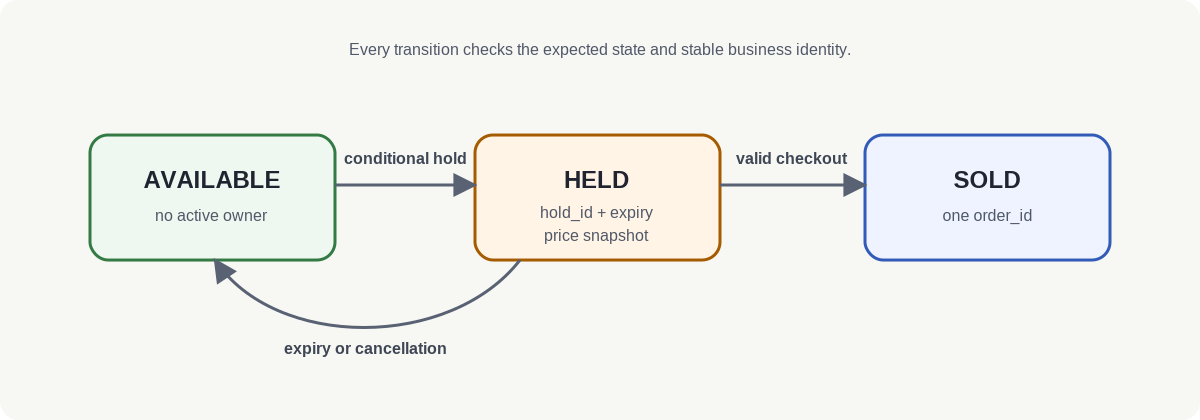
PostgreSQL stores one inventory row per (event_id, seat_id). Every hold and purchase must check and update that same row.
1. Make Competing Requests Take Turns
Suppose Alice and Bob both see A12 as available in Redis and click Reserve.
| Sequence | Alice’s request | Bob’s request |
|---|---|---|
| 1 | Starts a transaction and locks A12’s inventory row | Starts a transaction and waits for the same row lock |
| 2 | Checks availability, creates the hold, and marks A12 HELD |
Still waits |
| 3 | Commits; PostgreSQL releases the lock | Acquires the lock and reads A12’s current state |
| 4 | Receives the successful hold | Sees Alice’s unexpired hold, rolls back, and rejects the request |
A row lock makes competing writers take turns. A conditional update changes the seat only if it is still available or its previous hold has expired. Together, these stop both requests from reserving A12.
If Alice rolls back instead, Bob can acquire the lock, recheck availability, and try to hold the seat. Looking at Redis first does not decide who wins.
2. Make the Whole Selection Succeed or Fail Together
Suppose Alice selects A12 and A13. A transaction groups the database work:
BEGIN
  Lock and check A12 and A13
  Create the hold and save both selected seats and prices
  Conditionally mark both inventory rows HELD
  If both rows were updated: COMMIT
  Otherwise: ROLLBACK
Atomic means all these changes are saved together, or none are saved. If A13 is already taken, roll back the entire transaction, including any change to A12 and the new hold records.
Updating two seats does not automatically mean both succeeded. The service must check that the updated-row count matches the requested-seat count before committing.
3. Use a Consistent Lock Order
If Alice selects A12 then A13, while Bob selects A13 then A12, each could lock one seat and wait for the other. This is a deadlock.
Lock selected inventory rows in a consistent order, such as ascending seat_id, regardless of the customer’s selection order. Hold creation, checkout, and expiry processing must also follow the same lock order for the shared hold and inventory records. If PostgreSQL reports a deadlock, roll back and retry the transaction a limited number of times.
Keep these transactions short. Commit before calling payment or updating Redis; do not hold database locks while waiting for those services.
4. Recheck Ownership and Expiry Before Every Change
A hold ends at its database deadline. A new request can reclaim it after that deadline even if the cleanup worker has not run.
- New hold: check availability and expiry using database time after acquiring the relevant locks.
- Checkout: verify the customer owns the unexpired hold, then protect it with the checkout deadline described in the HLD.
- Sale: change
HELDtoSOLDonly for the expected hold and order, while the checkout deadline is valid. - Cleanup: release seats only if the expected hold still owns them and its current deadline has passed. An old cleanup job must not release a newer hold or an active checkout.
Recommended Approach: Lock, Check, Update, and Commit Together
Use PostgreSQL row locks to coordinate competing requests, conditional updates to enforce seat ownership, and a transaction to keep the whole selection atomic. Redis displays availability; it never authorizes a hold or sale.
Problem 3: What If Payment Fails or Its Result Is Unknown?
Problem 2 keeps seat changes atomic inside PostgreSQL. Payment adds a different problem: the provider can charge the customer even if our service never receives the response.
The HLD uses two transactions, with the payment call between them:
Transaction 1: save pending order + payment; protect the hold
                             ↓ commit
                      Call payment provider
                             ↓
Transaction 2: save the verified result and booking changes
We cannot roll back a provider charge with PostgreSQL ROLLBACK. We must record what happened and finish the booking or refund the payment.
1. Handle Success, Failure, and Unknown Results Differently
Use the saved order_id and payment retry key to identify the same checkout throughout the flow.
| Payment result | Database changes | Customer sees |
|---|---|---|
| Confirmed success, with a valid checkout hold | In one transaction, mark payment successful, seats SOLD, hold CONSUMED, and order CONFIRMED; save the ticket-delivery outbox job |
Booking confirmed; tickets follow |
| Confirmed failure | Record payment failure and set the order to PAYMENT_FAILED; release its reserved purchase quota and conditionally release seats still held by this order in the same transaction |
Payment failed; no booking |
| No reliable result yet | Keep the payment unresolved and set the order to PAYMENT_UNKNOWN; check the provider for the result |
Payment is being checked |
A timeout belongs in the third row. It does not prove that payment failed.
2. Recover When the Payment Response Is Lost
Suppose Alice clicks Pay. The provider charges her, but the connection drops before Order Service receives the result.
- Keep the existing order and payment. Do not create a new checkout or charge using a new retry key.
- Find the actual result. Query the provider using the saved payment reference, or use its supported lookup or retry mechanism with the original key if no reference was returned. A verified payment callback can also supply the result.
- Apply the matching outcome above. Confirm the booking only if the seats still belong to this order and the checkout deadline is valid. Otherwise handle a successful charge as a refund case.
A background recovery job must check unresolved payments, so recovery does not depend on the customer keeping the page open. The order page reads the saved status and shows the eventual result.
3. Stop Protecting Seats at the Checkout Deadline
The original hold gives the customer time to start checkout. The separate checkout deadline gives payment a limited time to finish. It must be set before the original hold expires.
If the result is still unknown at that deadline, release unsold seats and the order’s reserved purchase quota exactly once, using the ownership checks from Problem 2. Continue checking the payment, but do not keep extending the reservation indefinitely.
If a previously unresolved payment succeeds after the deadline or after the seats were released:
- Save the successful payment result.
- Set the order to
REFUND_PENDINGand save a refund job in the same transaction. - Process the refund using a stable retry key. Set the order to
REFUNDEDonly after provider confirmation.
Never take seats from another customer to complete a late payment. If a refund remains unresolved, retry or flag it for support.
4. Make Retries and Callbacks Safe to Repeat
An operation is idempotent when repeating it returns the existing result instead of doing the work twice.
| Repeated action | How we prevent duplicate work |
|---|---|
| Customer retries checkout | Keep one order per hold_id; reuse its payment and retry key. Reject reuse of a request key with different details. |
| Service retries the payment call | Use the same saved provider retry key. If its retention window has passed, check the old payment rather than blindly charging again. |
| Provider repeats a callback | Verify its signature and payment details, then record its provider message ID with the result transaction. Ignore an already processed message. |
| Different callbacks arrive out of order | Lock and check the current order and payment state. An old failure must not undo a confirmed success; a refunded order must not become confirmed. |
| Service stops while applying success | An uncommitted database transaction rolls back. Recovery checks the provider and retries the same booking transaction. If it already committed, return the saved result. |
| Ticket-delivery job arrives again | Reuse tickets identified by unique (order_id, seat_id) instead of issuing another set. |
Record callback processing only when its database changes commit. Acknowledge a callback after its result has been durably handled, so a failed transaction can be retried safely.
Recommended Approach: Save the Attempt, Resolve the Result, Retry Safely
Keep one identity for each checkout and payment. Treat unknown results separately from failures, confirm all booking changes together, and refund successful payments that can no longer claim their seats. Never hold a database transaction open while waiting for the provider.
Problem 4: How Do We Keep Seat-Map Responses Small?
Problem 1 reduced database reads with Redis. The capacity estimate still shows a network problem: 20,000 section reads/s at 100 KB each is about 2 GB/s of uncompressed payload. We should also reduce what the browser downloads.
1. Load the Venue Layout Once
The fixed layout contains section names, row labels, seat numbers, and map positions. These do not change whenever someone books a seat.
- Find the layout. Read the event’s
venue_id, then the venue’slayout_url. - Download it through the CDN. Store the layout as a static file with a versioned URL. The browser can cache and reuse that version.
- Reuse it during refreshes. Load changing availability separately rather than downloading the map again. A changed layout gets a new URL.
The layout tells the browser where to draw A12. Event availability tells it how to display A12 now.
2. Load Only the Section Being Viewed
Client → API Gateway → Inventory Service → Redis section hash
When the customer opens section A, request availability:evt_123:A. Return only the fields needed for display: seat ID, ticket type, status, price, and version. The currency can be sent once per response when it is shared by the section.
The browser combines these values with the saved layout. Moving to section B loads B’s availability, rather than all 50 sections. This keeps the response aligned with the section-wise cache from Problem 1.
3. Refresh Without Sending Unchanged Seats Repeatedly
Start with periodic reads of the visible section. Spread refresh times slightly across clients so they do not all request it at the same instant. Use response compression to reduce bytes on the network; the earlier 100 KB estimate is an uncompressed assumption.
If full-section refreshes remain expensive, add server-sent events to send changes after committed bookings. For example:
A12: HELD, version 8
A13: SOLD, version 12
The browser updates those seats instead of downloading the whole section again. Use seat versions to ignore older changes. Subscribe to updates before fetching the section snapshot, buffer arriving changes, then apply any newer versions. Repeat this on reconnect so changes during snapshot loading are not lost. The push path needs its own change-distribution mechanism; updating Redis alone does not notify browsers.
A displayed update still does not reserve a seat. Every hold and purchase follows the PostgreSQL checks from Problem 2.
Recommended Approach: Reuse the Layout and Refresh the Visible Section
Keep the fixed map in a browser-cacheable CDN asset, serve section availability from Redis, and start with simple section refreshes. Add pushed seat changes only when repeated full-section responses become a measured bottleneck.
Search Improvement: When Should We Add Elasticsearch?
The HLD starts with PostgreSQL queries over events and venues. Keep that while indexed queries meet the product’s needs. Add Elasticsearch when discovery needs richer text matching, typo tolerance, relevance ranking, or independent search capacity.
1. Keep One Search Document per Event
Combine the fields needed for search into one document:
Event ID: evt_123
Name: Live in Mumbai
Artist: Example Artist
Venue: Example Arena
City: Mumbai
Category: Concert
Starts at: 2026-11-01T19:00:00+05:30
Status: ON_SALE
The document copies event fields from events and venue fields from venues. Elasticsearch searches these prepared documents rather than joining the PostgreSQL tables for every search. Configure text matching and ranking for event names, artists, and venues, with filters for city, category, date, and status.
2. Send Search Requests to the Index
Client → API Gateway → Catalog Service → Elasticsearch
Catalog returns matching events and their IDs. Search is eventually consistent, so catalog edits may take time to appear. When a customer opens an event, Catalog still reads its current details from PostgreSQL. Seat availability continues through Inventory and Redis; a search result never guarantees that tickets remain available.
A separate Search Service is optional. Catalog can query Elasticsearch directly until search needs its own deployment or ownership.
Recommended Approach: Add Search Capabilities When They Are Needed
PostgreSQL stays the source of catalog data. Elasticsearch is a searchable copy with its own storage, indexing work, and operational cost. It improves discovery, while PostgreSQL remains responsible for booking correctness.
Where We Have Arrived
We started with three services and a shared PostgreSQL database. The design now adds faster reads and controlled admission around that same transactional booking flow.
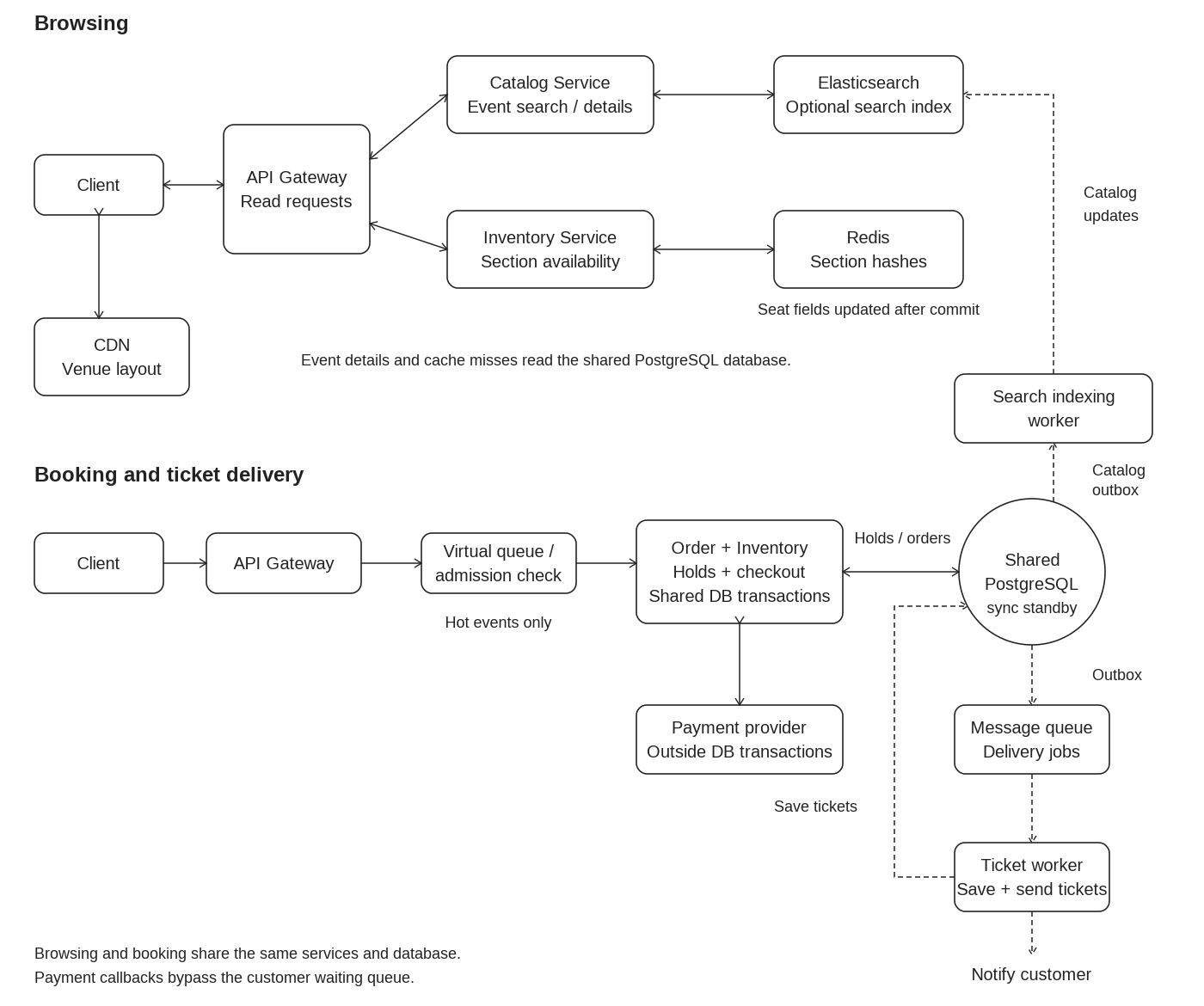
The diagram shows browsing and booking separately for readability. They use the same API Gateway, services, and PostgreSQL database. Elasticsearch is the search improvement described above; it can be added after the PostgreSQL search baseline.
- Find events. Catalog queries PostgreSQL, or Elasticsearch when richer search is needed. The indexing worker keeps that search copy updated from catalog outbox jobs.
- View seats. The browser reuses the CDN venue layout and loads the visible section’s Redis hash through Inventory. Cache misses reload PostgreSQL; committed seat changes update the cached fields.
- Control hot sales. The API Gateway routes customers to the virtual queue and checks admission before forwarding hold and checkout requests. Waiting does not reserve seats, and payment callbacks do not wait in this queue.
- Reserve and purchase safely. Row locks, conditional updates, and short PostgreSQL transactions protect whole seat groups. Checkout commits its preparation, calls payment, then commits the verified result and booking changes together.
- Deliver and recover. Outbox jobs drive ticket delivery. Stable payment identities and saved order states support safe retries, unknown-result recovery, and refunds when a charge cannot become a booking.
How We Address the Non-Functional Requirements
| Requirement | How the final design addresses it |
|---|---|
| Correctness | PostgreSQL row locks and conditional updates enforce seat ownership. Transactions save the whole selection or roll it back; unique order and ticket keys make retries safe. |
| Read consistency | Redis and Elasticsearch may lag. Seat versions reject older cache updates, expiry reloads cached sections, and every booking rechecks PostgreSQL. |
| Latency | Indexed catalog queries, Redis section reads, reused CDN layouts, and short transactions reduce work per request. The queue limits booking contention. |
| Availability | Cached browsing can continue within its limits during some failures. Limit database fallback if Redis fails, and pause booking when database state is uncertain. |
| Durability | Confirm PostgreSQL commits after synchronous standby acknowledgement. Keep order confirmation and delivery jobs in one transaction, use a durable queue, and test failover and backup recovery. |
| Peak traffic | Cache repeated section reads and admit only as much booking work as the database and payment flow can sustain. Reserve capacity for active checkouts, callbacks, and retries. |
| Admission and limits | The gateway verifies event admission. Checkout locks the customer-event quota record so concurrent requests cannot exceed the account’s purchase cap. |
The latency numbers and single-node failure guarantee remain design targets. Verify them with peak-load tests, Redis failure tests, and PostgreSQL failover tests before claiming they are achieved. Queue waiting and external payment time are measured separately.
Redis and Elasticsearch make reads faster. The virtual queue controls load. PostgreSQL decides who owns the seats and whether a booking is confirmed.
Interview tip: Explain the simple booking flow first, then show how caching, admission control, and payment recovery address its specific limits.
Join the discussion
Spot a mistake or have another perspective? Share your feedback, insights, or suggestions.